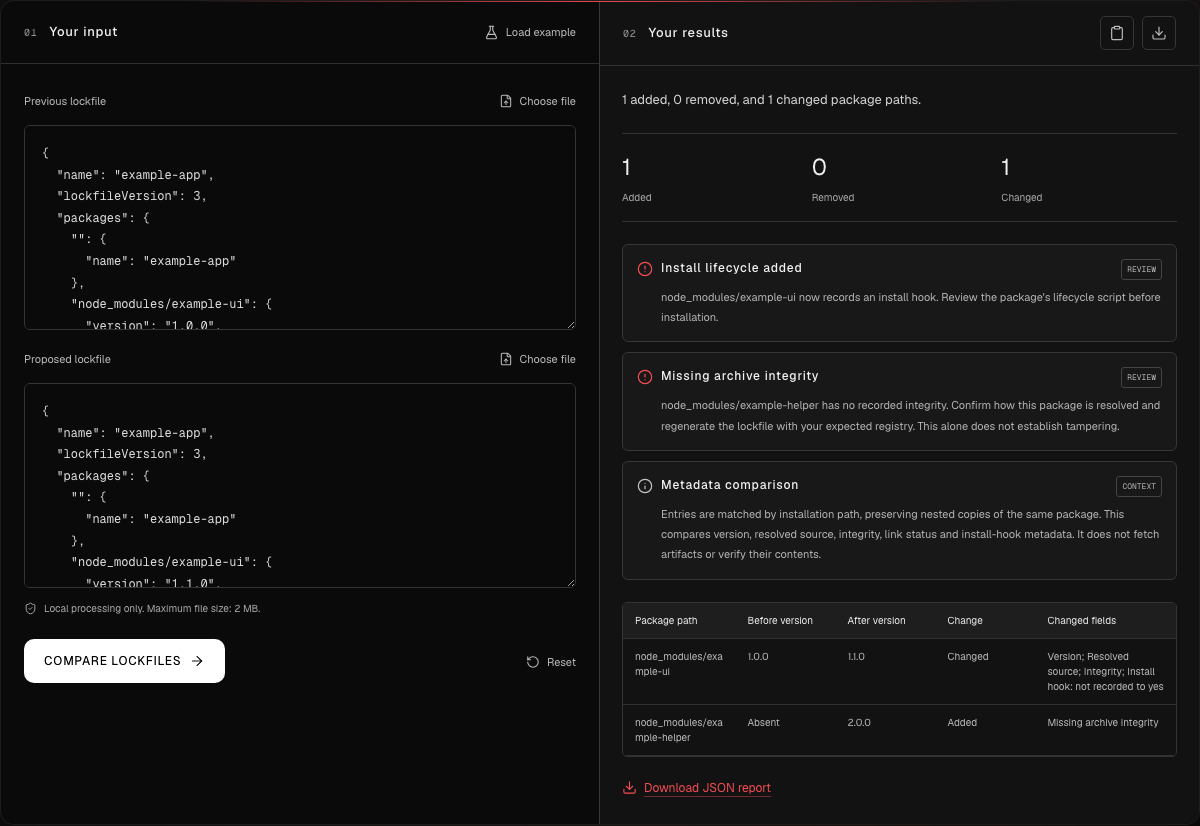
A dependency update arrives with passing tests and a long package-lock.json diff. The requested change looks small. The difficult part is deciding which lines deserve attention before approving it.
A useful review starts with three questions: where will the package come from, what might run during installation, and what evidence identifies the expected artifact? Those questions help turn a wall of generated text into a short set of decisions.
The aim is to understand the proposed change well enough to approve it, request evidence or hold it for investigation. A lockfile cannot answer every security question about the software it describes.
Start with the change you intended
Ask the author to explain the intended update in one sentence. Then compare that intention with the full dependency change, including indirect dependencies. Keep the previous and proposed lockfiles available so another reviewer can reproduce the comparison.
Record the package-manager version and relevant configuration. A format migration can create considerable noise. Where practical, separate that migration from an ordinary dependency update so the review has a clear purpose.
Treat package installation paths as distinct records. Two nested copies with the same package name may have different versions or metadata. npm’s lockfile format documentation explains the packages mapping and its fields.
Ask why the source changed
The resolved field describes a package’s resolution source. Review changes to the hostname, transport or dependency source type alongside the version update.
A move to an approved internal registry can be legitimate. A Git dependency can also be deliberate. The review question is whether the new source matches your project’s expectations and who approved that decision.
For example, “we moved packages to our internal registry” needs more detail than “this is a normal update.” Ask for the expected registry and the relevant change record. Leave an explanation in the pull request so the next reviewer does not have to reconstruct it.
An unfamiliar source is a reason to investigate. It is not enough evidence to label a package malicious.
Inspect a newly recorded install hook
The lockfile’s hasInstallScript flag indicates a preinstall, install or postinstall script. The flag does not contain the command or the script’s implementation.
If the flag appears in the proposed version, request the actual package contents and inspect the relevant script through your approved review process. A native build step and an unexpected downloader need different explanations, even though both can produce the same metadata flag.
Ask what the script needs to access and whether that fits the build environment. When further execution is necessary, use an appropriate isolated environment with deliberate access to credentials and network resources. Record what was inspected separately from what was executed.
Interpret integrity metadata carefully
An integrity field identifies expected artifact bytes. Its presence does not establish that the code is trustworthy, and a changed value can be expected when an artifact changes.
A missing value needs context: consider the dependency source and the package-manager representation. Preserve the question until the reviewer can explain it. Do not manufacture a hash or delete a flag merely to make a finding disappear.
Keep the evidence precise. “The integrity text changed” describes an observation. “The downloaded bytes match the reviewed expectation” requires a relevant verification step. “The package is safe” is a much broader claim.
Check the configuration used by the build
The lockfile is one input to installation. Review the configuration that determines registry selection, credentials, TLS verification and script behaviour.
npm reads configuration from several places, including project and user files, environment variables and command-line options. Reviewing a repository’s .npmrc alone therefore leaves questions about the effective CI configuration. npm’s configuration-file documentation also explains registry-scoped authentication settings.
For builds using npm ci, check its behaviour against the version you run. It requires a lockfile and rejects a mismatch with package.json rather than updating the lockfile. The --ignore-scripts option prevents package scripts during installation, but explicitly requested commands such as npm run build still execute their intended script. It is a control to understand and test, rather than a sandbox. See the npm ci reference.
Practise with a small, reproducible case
BreachLine’s synthetic lockfile lab provides before-and-after fixtures, recorded outputs and an unchanged-input control. It introduces a source change, install-hook metadata and a missing integrity field. No package was downloaded or executed for that exercise.
Use it to practise asking a follow-up question for each signal. Then compare the previous input against itself. The control helps check the comparison’s behaviour on those tracked fields; it does not certify the dependency tree.
Record evidence for each changed field
Use a compact review table to separate observations from the evidence that would resolve them. Adapt the requested evidence to your registry policy and build environment; the table is a starting point, not an automatic approval rule.
| Observation | Evidence to request | Decision to record |
|---|---|---|
| Package source changed | Expected registry or repository and the approved migration record | Whether this source is intended for this package |
| Install-hook flag appeared | Actual hook implementation and its expected build purpose | Whether its behaviour and access fit the build |
| Integrity field changed or disappeared | Reviewed artifact expectation and the package-manager explanation | What was verified and what remains unknown |
| Configuration was corrected | Effective CI settings and a relevant repeat of the check | Whether the build adopted the intended change |
Keep the original inputs with the review note. A later retest is easier to assess when it names the same package path and question. If the proposed fix only changes the report, without changing the underlying condition or explaining it, the review still needs evidence.
Leave a decision someone else can follow
A useful review comment records the package path, changed field, supporting evidence and remaining question. For an accepted change, state why the source and installation behaviour are expected. For a blocked change, name the evidence needed to continue.
After an approved correction, regenerate the lockfile through the intended package-manager workflow and compare it again. Preserve legitimate changes with their explanations. Build compatibility and runtime behaviour still need their own checks.
Try the lockfile diff, dependency review and npm configuration review in BreachLine’s free browser toolkit. No signup is required. Local reviews stay in your browser; online and optional AI features explain their separate data boundaries. Use the results to guide the next question and retain the evidence behind your decision.
Sources
- npm CLI v11: package-lock.json format, accessed 15 October 2026.
- npm CLI v11: npm ci and script controls, accessed 15 October 2026.
- npm CLI v11: npmrc files and credential scoping, accessed 15 October 2026.
- BreachLine: Supply-chain review, a reproducible lockfile lab, published 16 September 2026; accessed 15 October 2026.
- BreachLine: Free security toolkit, accessed 15 October 2026.