A dependency update can change its download source and installation behavior alongside its version. In this controlled lab, one changed package and one added package produce three concrete review questions: why did the source change, what installation script was introduced, and why is an integrity field missing?
We ran BreachLine's deterministic review functions against the synthetic examples included in the public tools on September 16, 2026. No real target was contacted, and no package was downloaded or executed. This article is a reproducible lab, not a captured autonomous Nebula session or a report of malware, a CVE, or a compromised vendor.
What changed in the lockfile fixture
The lab uses two small npm v3 lockfiles. Download the before file, after file, and recorded analysis. They are inspection fixtures, not a project to install. Their sha512-example-before and sha512-example-after values are illustrative strings, not valid artifact checksums.
The proposed update contains these deliberate changes:
| Package path | Before | After |
|---|---|---|
node_modules/example-ui | Version 1.0.0, source under registry.npmjs.org | Version 1.1.0, source under packages.example.com |
node_modules/example-ui | Placeholder integrity string; no install flag recorded | Different placeholder integrity string; hasInstallScript: true |
node_modules/example-helper | Absent | Version 2.0.0, registry source, no integrity field |
The installation path matters: separate nested copies of a package must remain separate records. npm's packages format maps installation locations to metadata. Its resolved field describes the source, integrity records an artifact identifier, and hasInstallScript indicates a preinstall, install, or postinstall hook. None of these fields contains the hook's source code.
Reproduce the comparison and its control
- Open Lockfile diff, select Load example, then Compare lockfiles. The two inputs match the downloadable fixtures.
- Check the result: 1 added, 0 removed, 1 changed. Expand your review beyond the counts to the changed fields and findings.
- For a control, replace the proposed input with the previous input and compare again. The observed result is 0 added, 0 removed, 0 changed, with no table rows.
- Open Dependency review, paste the after file, and run the review. This independently inventories 2 dependencies, 1 missing integrity field, and 1 recorded install hook.
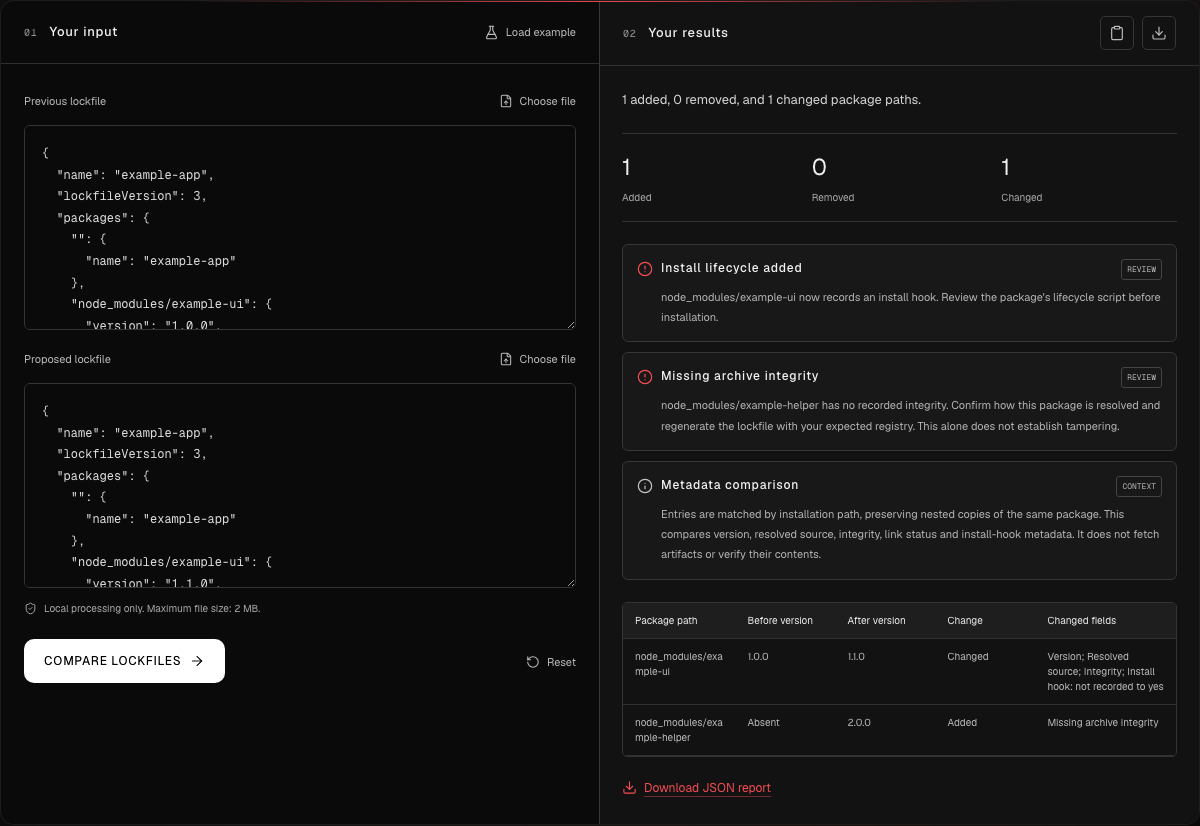
Synthetic lab capture: the lockfile comparison surfaces the changed installation metadata and the added package. It does not show package execution.
The comparison reports Install lifecycle added and Missing archive integrity. The separate dependency review also reports Custom or nonregistry source for example-ui. That distinction is useful: a diff answers what changed, while the inventory review describes the proposed state. Download each tool's JSON report to preserve the observations alongside the input files.
Investigation notes: signal to conclusion
These notes document our review decisions, the tests we ran, and the evidence that shaped the conclusion.
Review a dependency update before installation
Synthetic BreachLine catalog fixtures. Deterministic functions executed on September 16, 2026. No target contacted, package fetched, or lifecycle script executed. No autonomous Nebula session was recorded.
Documented review decisions, tests, observations, and the evidence behind them.
Initial signal
Installation metadata changed
example-ui changes version, source, integrity text, and install-hook metadata; example-helper is added.
Hypothesis
The update needs more than a version review
A different source and a newly recorded hook may require separate approval. Missing integrity needs an explanation.
LimitationsThese signals do not establish malicious behavior.
Test
Compare, control, and inspect
Run before against after, repeat with before against itself, then review the after file independently.
Supporting evidence 1 item
Observed comparison metrics
before vs after: Added 1; Removed 0; Changed 1 before vs before: Added 0; Removed 0; Changed 0Observed result
The checks identify the planted review signals
Dependency review reports two entries, one missing integrity field, and one install hook.
Supporting evidence 1 item
Dependency review findings
Install lifecycle recorded Custom or nonregistry source Missing archive integrityLimitationsIntegrity values were not verified against package bytes. Hook contents and runtime behavior remain unknown.
Conclusion
Request evidence before approving the update
Verify the intended source and inspect the actual hook. Regenerate real lockfiles from reviewed inputs; do not invent missing hashes.
LimitationsThe lab demonstrates metadata checks, not exploitation or remediation of a real package.
Separate observations from demonstrated impact
A changed integrity string is expected when package bytes change. Here, the tool only compares text. It has not authenticated a publisher, validated a checksum, or established that either fixture describes a real release. Similarly, an approved internal registry can legitimately explain a source change.
The hook flag deserves inspection because installation can invoke package scripts. npm documents the relevant lifecycle events, including ordinary build steps. The flag alone cannot tell us whether a hook compiles a native module, downloads an artifact, or does something harmful.
For a real review, collect the package contents, hook source, expected registry policy, and build configuration through your authorized process. Record the exact evidence that resolves each question. The control comparison checks that unchanged tracked fields produce no differences; it does not certify every field in a lockfile or the safety of a dependency tree.
Check the installation configuration
The npm configuration review provides a second, independent exercise. Download the before configuration and retest configuration, or load the tool's example and run the review:
registry=https://registry.npmjs.org/
@company:registry=http://packages.example.com/
strict-ssl=false
//packages.example.com/:_authToken=${NPM_TOKEN}
ignore-scripts=false
The recorded result contains 5 settings, 2 registry mappings, 1 authentication entry, and 0 unscoped authentication entries. Its two attention findings identify the HTTP registry and disabled TLS certificate verification. The token reference is a placeholder; the reviewer omits authentication values from results and does not resolve environment variables.
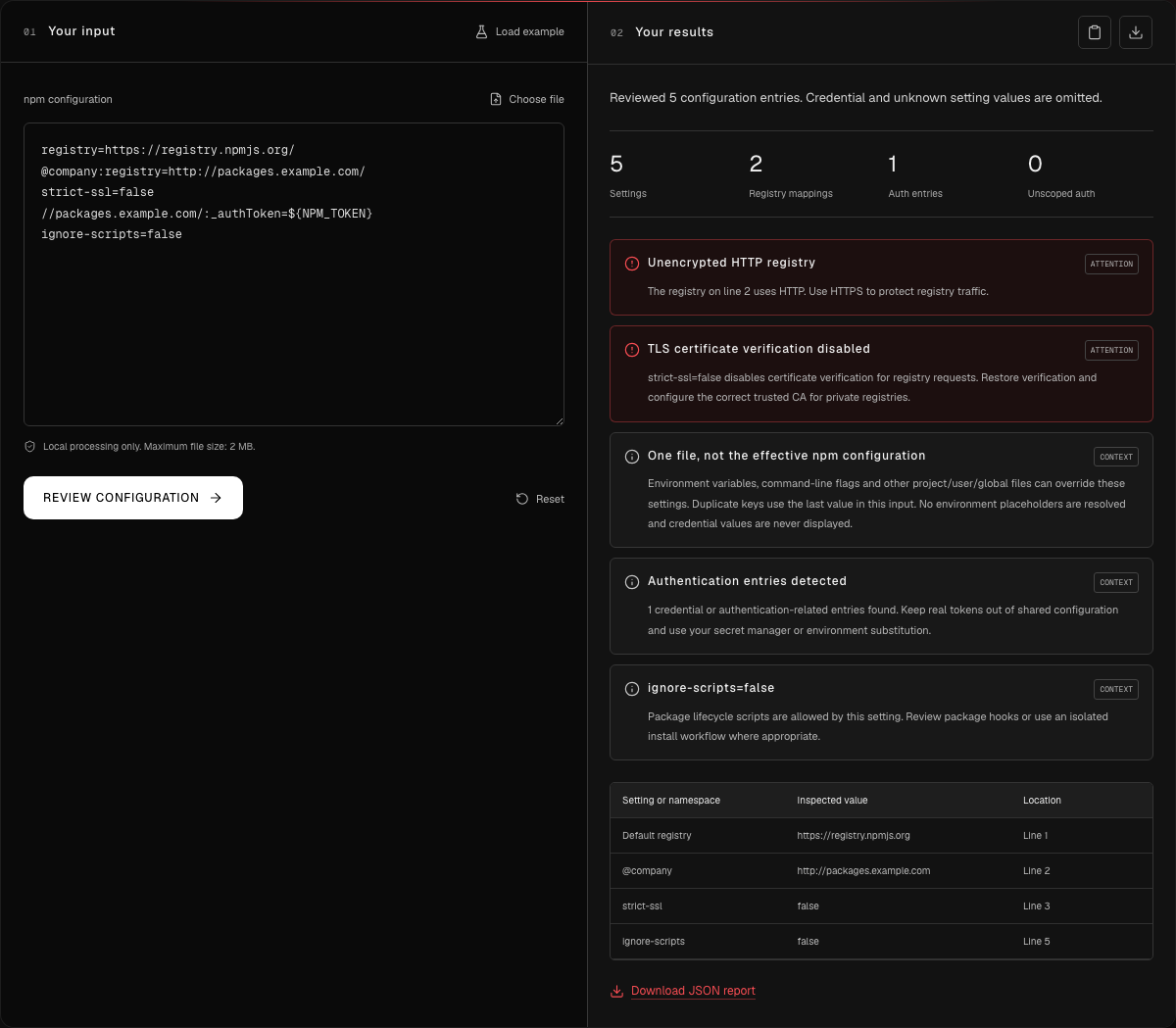
Synthetic lab capture: two transport configuration findings, with authentication values omitted from the report.
npm supports registry-scoped credentials and multiple configuration files. This example already scopes its authentication entry. That does not repair the HTTP registry or prove which settings a particular build uses. This separate configuration fixture is not evidence that example-ui was installed with these settings.
Make a specific change, then retest
For the configuration exercise, change the scoped registry to HTTPS, set strict-ssl=true, and set ignore-scripts=true. Running the reviewer again produced 0 attention findings, down from 2. The informational notes about authentication, configuration precedence, and script behavior remained. Both outputs are included in the recorded analysis, alongside the lockfile comparison, control, and dependency inventory.
That retest establishes that the supplied text no longer triggers those two checks. It does not prove an HTTPS endpoint exists or that a build adopted the settings. In a real project, configure the correct trusted certificate authority and verify the effective build configuration. npm's configuration reference explains TLS verification and script controls; explicit script commands can still execute when ignore-scripts is enabled.
For the lockfile itself, do not remove flags or manufacture integrity values to clear findings. Resolve the source and hook questions, regenerate the lockfile from reviewed dependencies with the intended package manager configuration, and compare again. Preserve legitimate changes with their explanation. Actual installation and build compatibility require separate verification in an appropriate isolated environment.
Applying this method to Nebula investigations
This lab shows an evidence structure that an AI-assisted Nebula investigation can use: state a hypothesis, choose a bounded test, retain its inputs and observations, then report what remains unknown. A claim about executed code would need execution evidence. A claim about remediation would need a relevant retest.
We have demonstrated deterministic metadata review here. A future recorded Nebula investigation should link its actual run artifacts and authorized scope before attributing discoveries or outcomes to the agent. You can reproduce today's exercise directly with the supply-chain tools and the published fixtures.
Sources
- npm CLI v11: package-lock.json format, accessed September 16, 2026.
- npm CLI v11: lifecycle scripts, accessed September 16, 2026.
- npm CLI v11: npmrc configuration and credential scoping, accessed September 16, 2026.
- npm CLI v11: configuration reference, accessed September 16, 2026.
- BreachLine synthetic lab inputs and recorded analysis, September 16, 2026.
